
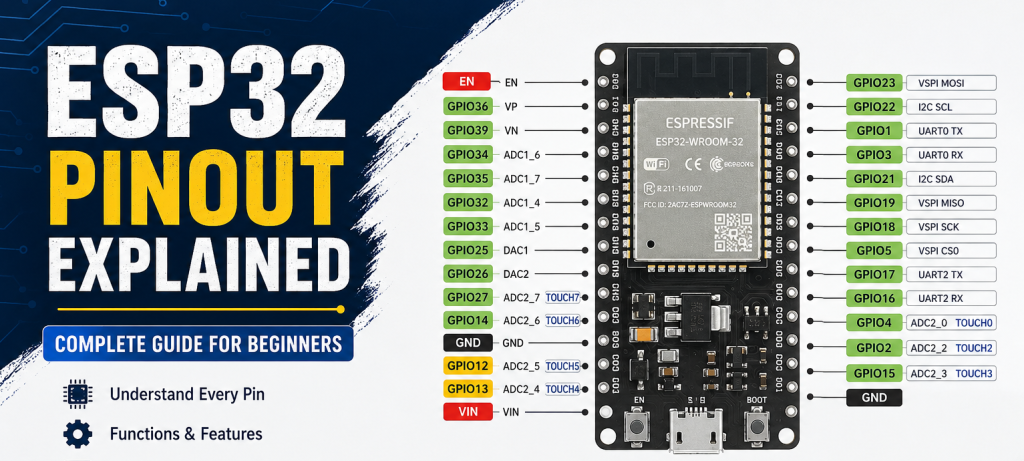
The ESP32 is one of the most powerful and popular microcontrollers used in IoT, Robotics, Home Automation, and Embedded Systems projects. It comes with built-in WiFi and Bluetooth support, making it ideal for wireless applications.
In this guide, we will understand the ESP32 pinout, GPIO functions, power pins, communication pins, ADC, PWM, and important precautions while using ESP32 boards.
What is ESP32?
ESP32 is a low-cost and high-performance microcontroller developed by Espressif Systems. It is widely used for:
- IoT Projects
- Smart Home Automation
- Robotics
- Wireless Monitoring Systems
- Sensor Networks
- Industrial Automation
Main Features:
- Dual Core Processor
- Built-in WiFi & Bluetooth
- Multiple GPIO Pins
- ADC & DAC Support
- PWM Output
- SPI, I2C, UART Communication
- Low Power Modes
ESP32 GPIO Pins Explained
GPIO stands for General Purpose Input Output.
These pins can be used for:
- Digital Input
- Digital Output
- PWM
- ADC
- Communication Interfaces
ESP32 Power Pins
VIN Pin
Used to power the ESP32 board externally.
Typical Input: 5V
3.3V Pin
Provides regulated 3.3V output.
Important:
ESP32 works on 3.3V logic only.
Do NOT apply 5V directly to GPIO pins.
GND Pins
Ground connection pins.
All external modules should share common ground with ESP32.
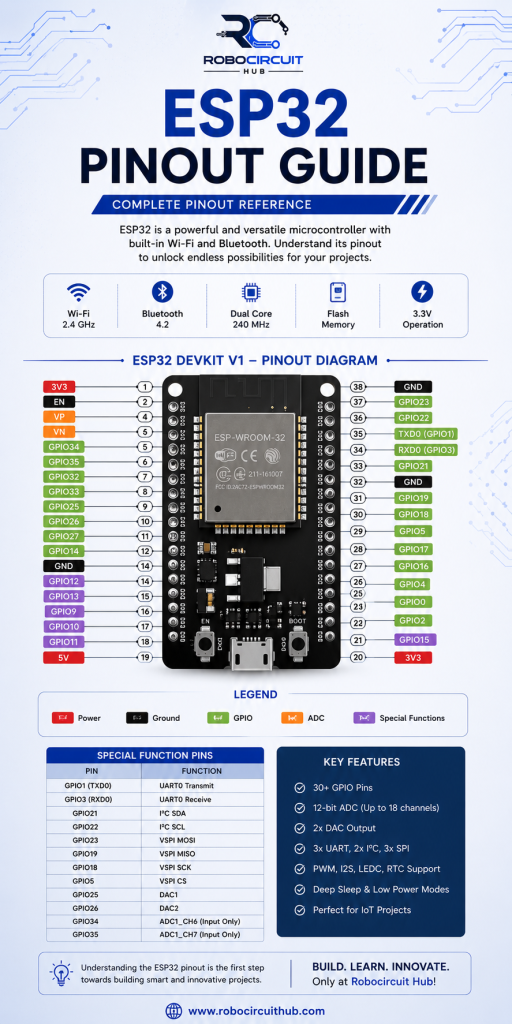
Important ESP32 GPIO Pins
GPIO 2
Commonly connected to onboard LED in many ESP32 boards.
GPIO 4
General purpose digital pin.
Useful for:
- Relays
- LEDs
- Sensors
GPIO 5
Often used for SPI communication.
GPIO 12
Boot sensitive pin.
Avoid pulling HIGH during boot.
GPIO 13
Supports PWM and ADC.
GPIO 14
SPI compatible GPIO.
GPIO 15
Boot configuration pin.
GPIO 18 & GPIO 19
Mostly used for SPI communication.
GPIO 21 & GPIO 22
Default I2C Pins.
- GPIO21 → SDA
- GPIO22 → SCL
GPIO 23
SPI MOSI pin.

UART Pins
ESP32 supports serial communication.
Default UART Pins
TX0 → GPIO1
RX0 → GPIO3
These are connected to USB programming interface.
Avoid using them for external devices during programming.
ADC Pins (Analog Input)
ESP32 has built-in ADC channels.
Common ADC Pins:
- GPIO32
- GPIO33
- GPIO34
- GPIO35
- GPIO36
- GPIO39
Used for:
- Potentiometers
- Analog Sensors
- Voltage Monitoring
Example Sensors:
- LDR
- Soil Moisture Sensor
- Gas Sensors
PWM Pins
ESP32 supports PWM on most GPIOs.
PWM is used for:
- Motor Speed Control
- LED Brightness
- Servo Control
Popular PWM Pins:
- GPIO2
- GPIO4
- GPIO5
- GPIO18
- GPIO19
SPI Pins
SPI communication is used for:
- Displays
- SD Cards
- RFID Modules
Default SPI Pins:
| Function | GPIO |
|---|---|
| MOSI | GPIO23 |
| MISO | GPIO19 |
| SCK | GPIO18 |
| CS | GPIO5 |
I2C Pins
Used for:
- OLED Displays
- RTC Modules
- Sensors
Default Pins:
| Function | GPIO |
|---|---|
| SDA | GPIO21 |
| SCL | GPIO22 |
DAC Pins
ESP32 also supports DAC (Digital to Analog Converter).
DAC Pins:
- GPIO25
- GPIO26
Used for:
- Audio Output
- Analog Voltage Generation
Touch Sensor Pins
ESP32 has capacitive touch sensing support.
Touch Pins:
- GPIO4
- GPIO12
- GPIO13
- GPIO14
- GPIO15
- GPIO27
- GPIO32
- GPIO33
Applications:
- Touch Buttons
- Smart Switches
- Home Automation
Input Only Pins
Some pins are input-only.
These include:
- GPIO34
- GPIO35
- GPIO36
- GPIO39
You cannot use them as output pins.
Pins to Avoid During Boot
Some pins affect ESP32 boot mode.
Avoid using:
- GPIO0
- GPIO2
- GPIO12
- GPIO15
Incorrect voltage on these pins may prevent booting.
ESP32 Pinout Best Practices
Use 3.3V Logic
Never apply 5V directly to GPIOs.
Use External Power for Motors
Do not power motors directly from ESP32.
Use Common Ground
Always connect GND together.
Add Pull-up/Pull-down Resistors
Useful for stable inputs.
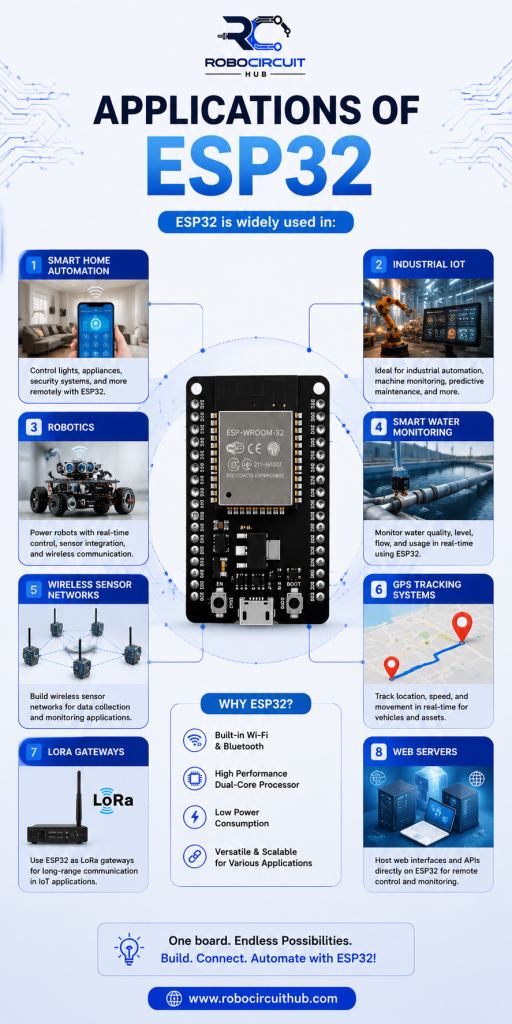
Applications of ESP32
ESP32 is widely used in:
- Smart Home Automation
- Industrial IoT
- Robotics
- Smart Water Monitoring
- Wireless Sensor Networks
- GPS Tracking Systems
- LoRa Gateways
- Web Servers
Conclusion
ESP32 is a powerful and flexible microcontroller for modern IoT and embedded systems projects. Understanding its pinout is very important before connecting sensors, displays, relays, and communication modules.
By selecting the correct GPIO pins, you can build reliable and efficient IoT systems using ESP32.
Whether you are a beginner or professional developer, ESP32 offers excellent performance for robotics, automation, and wireless embedded applications.
Explore more ESP32 modules, sensors, development boards, and IoT components at RoboCircuitHub.

Avnish BAJPAI (Founder)
Avnish Bajpai is an entrepreneur, embedded systems engineer, and technology innovator with over 8 years of experience in smart water management, IoT, and robotics. As the founder of RoboCircuitHub, he is passionate about developing intelligent solutions, empowering learners, and building innovative products that create a real-world impact.